Skip to content

Industry: Car workshops

Online booking software for car workshops

Instead of picking up the phone with greasy hands, give customers a page where they choose a free slot themselves. You get a bay schedule, job cards and tyre storage in one place.

In short

In a workshop the phone always rings while the mechanic is under a car. A customer who cannot get through drives to a competitor. One who does get through ends up with a slot pencilled into the notebook by guesswork. Later it turns out the timing belt booked for "some time in the morning" takes four hours, and two cars are down for the same lift.

Motuno is a booking calendar for car workshops. Customers pick a service, a day and a time on your website or in a widget, without creating an account. It shows only free slots, because it works them out from the bay schedule, service times and breaks.

Motuno is for general repair shops, tyre centres, air conditioning services and diagnostic stations. It is built for Polish workshops: the shop panel is in Polish, while the booking page and customer emails work in Polish and English.

What gets in the way most

  • Phone calls about appointments interrupt work on the car.
  • The bay schedule lives in a notebook or in one person's head, so two cars end up booked for the same lift.
  • Handing the car back starts an argument about a scratch that "wasn't there before".
  • In tyre season a rack labelled with marker pen stops being enough, and some sets never get collected.
  • A customer forgets the appointment and the lift stands empty.

How Motuno solves these problems

Online booking with labour times

Customers book in three steps: service, day and time, then their details and registration number. They can pick several services for one visit and the program adds up the labour time. They confirm the booking from a link in an email, which cuts down on fake requests. If you prefer, you can approve every booking by hand.

You can hook the booking page up to a button on your website, paste it in as a widget with one line of code or add it with the WordPress plugin. The link also works on your Google Business Profile. Business customers can enter their tax number and ask for a company invoice.
A bay calendar instead of a notebook

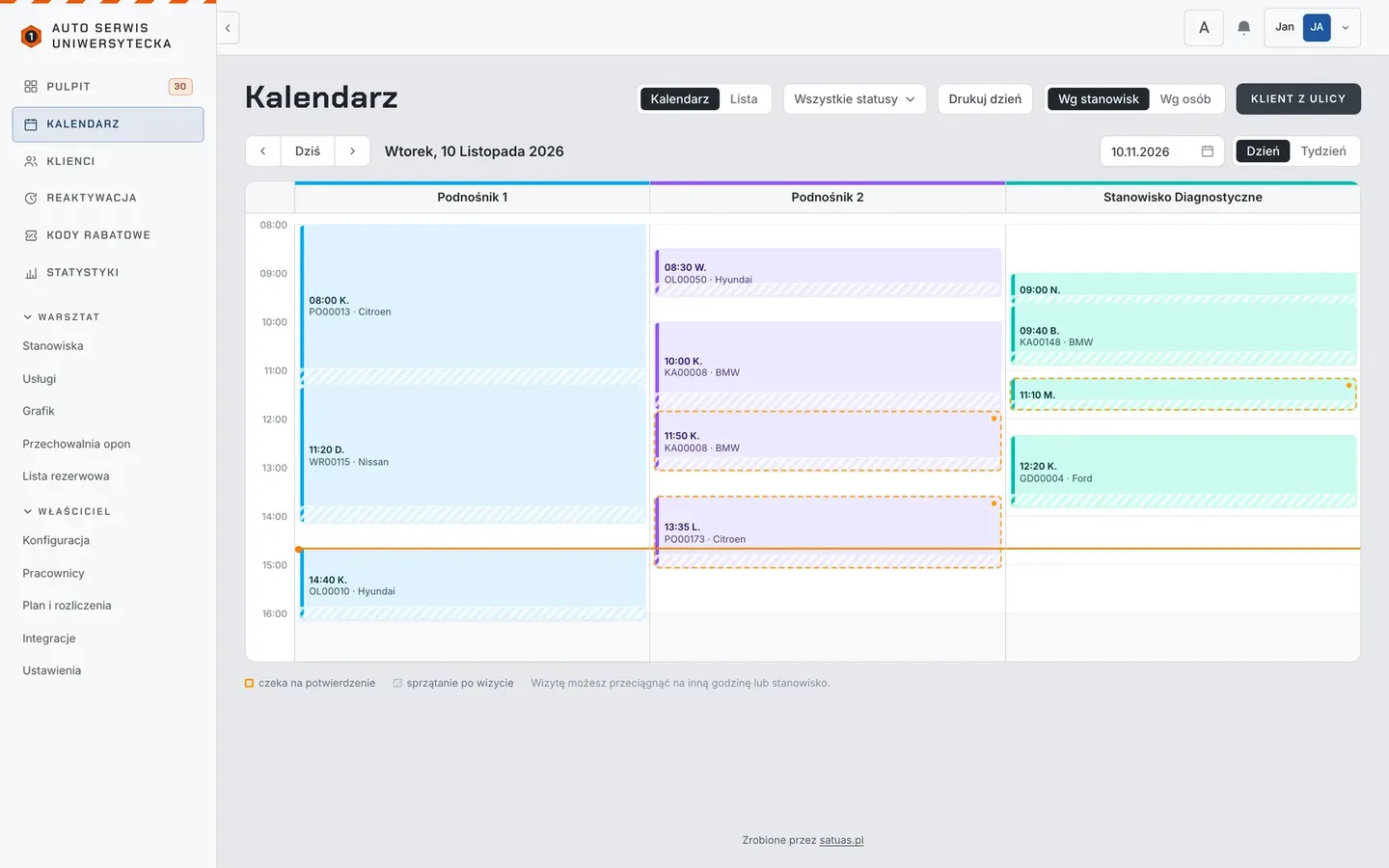
Each bay has its own working hours and exceptions, such as a shorter Friday or a lift out of action. Free slots come from the schedule, the service time and clean-up time, in steps from 5 to 60 minutes. You move appointments by dragging them in the day or week view.

A customer standing at the counter can be added with the walk-in button. A car left for the whole day can be taken in without assigning it to a bay. To get started there are ready-made service sets for mechanical work, tyres, air conditioning and inspections.

A job card with photos and a signature

When the car comes in you record mileage, fuel level, a description of its condition and up to 20 photos, and the customer signs with a finger on the screen. If the mechanic finds another fault, you send the customer a link by email or text and they approve the extra work without a phone call.

Every approved job lands on the job card and the invoice, so there is no argument at collection about what the customer agreed to. At hand-back there is a second signature and a printed job card.

Tyre storage with proper records

Every set has a label, a rack position and a season. The customer signs the storage agreement online on their own phone or on paper. You print the label from the program, and before the season the customer gets an email reminding them to collect, and on paid plans a text as well.

On top of that there is a database of customers and vehicles with visit history, plus customer import from a CSV file, so you don't retype records from your previous program.

Reminders, payments and invoices

Motuno sends emails: a reminder before the visit, set anywhere from an hour to a week ahead, a reminder when the car is due for its next service, and a rating request. On paid plans the visit and service reminders also go out by text, and the visit reminder reaches customers who left only a phone number too. Customers can add the appointment to their own calendar. When someone cancels, people on the waiting list get an email and the first to respond takes the slot.

Invoices go out through Fakturownia, iFirma or inFakt, with submission to KSeF, and the customer can pay for the work online from a link you send by email. You connect your PayU, Tpay or Przelewy24 account and your invoicing tool yourself, and the money goes straight into your account. Appointments sync both ways with Google Calendar. There is a REST API, webhooks and an MCP server for AI assistants.

A step-by-step example

This is one case from start to finish when you work in Motuno.

  1. 01

    You set up the workshop once

    You add bays, opening hours and services from the ready-made sets, then put the booking link on your website and Google Business Profile.

  2. 02

    The customer books and confirms

    They choose a service, day and time, enter their details and registration number, then confirm from the link in the email.

  3. 03

    The visit waits on your dashboard

    You see it in the bay calendar, and the customer gets a reminder before the visit.

  4. 04

    Taking the car in

    You record mileage, fuel and photos and the customer signs the card. Extra work is approved from a link, without a phone call.

  5. 05

    Hand-back and invoice

    Second signature, printed job card and an invoice in Fakturownia. If the customer collects the car later, you send them a link to pay online. Afterwards the customer gets a rating request and, later, a service reminder.

The product for this industry

See what it does, what it costs and what it looks like.

Available now

Motuno

booking software for car repair shops

Customers pick a free slot on your bays themselves

  • Online booking without a customer account
  • Website widget and WordPress plugin
  • Bay calendar with exceptions and drag-and-drop rescheduling
  • Service times worked out automatically, ready-made service sets
  • Email and text reminders (texts on paid plans), a waiting list, one-click cancellation

Free to start · paid plans from PLN 79 net/month + 23% VAT

View product
Motuno: day calendar with three bays (two lifts and a diagnostic bay), customer appointments and appointments awaiting confirmation

Questions about software for this industry

Does the customer need an account?

No. Customers book without an account and confirm or cancel from the link in their email.

Can I add a booking for someone standing at the counter?

Yes. The walk-in button adds the visit on the spot, and a car left for the whole day can be taken in without assigning a bay.

How do customers pay for a visit?

At the workshop as usual, or online: you send them a payment link from the visit, through PayU, Tpay or Przelewy24, and the money goes straight into your account. Booking itself needs no prepayment. You issue the invoice through Fakturownia, iFirma or inFakt (receipts through Fakturownia).

How do customers get reminders?

By email, as many hours before the visit as you choose, and on paid plans by text as well: Standard includes 75 texts a month, Pro 200 and Business 400. Confirmations and rating requests go by email, and customers can add the visit to their own calendar.

How much does it cost?

The Free plan covers one bay and 30 online bookings a month. Standard, for up to two bays with unlimited bookings, costs PLN 79 net, Pro, for up to five bays, PLN 199 net, and Business, for up to ten bays, PLN 349 net a month, plus 23% VAT. A year costs the same as 10 months.

Do I need a mobile app?

No. Motuno runs in the browser on a computer, tablet or phone, so you can collect the signature at intake on a tablet by the bay.

Try Motuno at your business

Start without paying and try the product on your own data. If you have a question, get in touch.