Skip to content

Industry: Equipment rental

Software for equipment rental shops

See who has which item and when it's due back. Sarento brings bookings, handovers, returns, deposits and contracts together instead of spreading them across a notebook, a whiteboard and a spreadsheet.

In short

In a rental shop one question comes up more than any other: "will you have two heaters on Friday?". To answer it you check the notebook, the whiteboard and the spreadsheet, then ask a colleague whether one of them went off for repair. With a few dozen items that is everyday life. In high season it is a queue at the counter.

Sarento keeps a catalogue of individual items with inventory numbers. Each booking has a pickup and return time, and the program checks availability to the hour, allowing for servicing and a buffer after each return. The same item cannot go out to two customers.

It is built for small and medium shops renting construction, garden, event and sports equipment, power tools and photo and video gear. It runs in the browser, so there is nothing to install. Sarento is built for Polish rental businesses: the app, booking page and emails are in Polish.

What gets in the way most

  • You cannot tell at a glance which item is out and when it will be back.
  • The same item gets promised to two customers or sent for repair in the middle of a booking.
  • Deposits get mixed up with revenue, and late returns are settled from memory.
  • Returns turn into arguments about damage or a missing charger.
  • Periodic inspections slip because nothing reminds you.

How Sarento solves these problems

Individual items, not "three compactors"

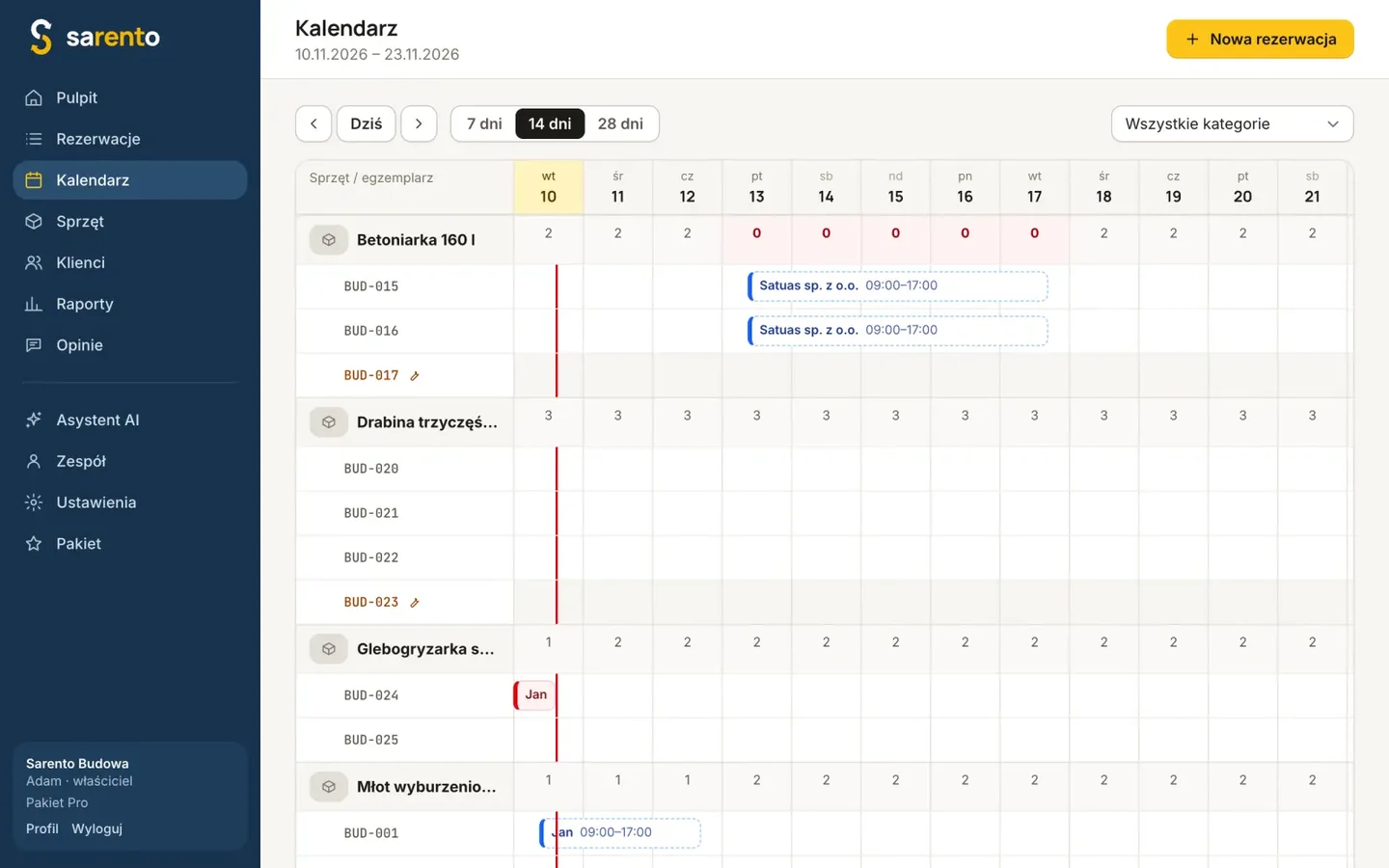
Every item has an inventory number, a serial number and a status: working, under repair or retired. You assign each booking to a specific item, and the occupancy chart shows 7, 14 or 28 days at once. You see straight away what comes back tomorrow and what can go out now.

Availability is checked when you save, edit and hand over. After each return you can set a buffer from 15 minutes to a full day, per product, for cleaning or charging batteries. The buffer runs from the actual return, not the planned one.
Handovers and returns without disputes

At handover you pick items by number, take the deposit and payment, and the program prints a rental contract with a handover protocol. The customer can sign with a finger on a tablet or phone and gets a copy of the document via a link.

At return you check the condition of each item, the program works out any lateness, and damaged equipment goes to servicing. You settle the deposit against what is owed and sign the return protocol.

A separate deposit ledger

Deposits have their own ledger: taken, withheld or returned. Entries cannot be edited after the fact, so the till matches the program. You accept payments in cash, by card, by bank transfer or online.

For longer rentals you can set up to 10 price tiers, and give regular customers a discount. Invoices for the rental and late fees go out through Fakturownia, iFirma or inFakt, receipts through Fakturownia, and deposits stay off the invoice. The monthly report shows revenue by payment method, deposits held, servicing costs and your best-earning equipment.

Inspection reminders

Each item has a service history with costs. You set an inspection every so many days or engine hours, and before it is due a reminder appears on the dashboard. You record the hour meter reading at handover and return. If you try to hand out equipment that is overdue, the program warns you but leaves the decision to you.

Customers get an email the day before the return date, and if they are late, further reminders every few days. Paid plans add texts: an hour before the return, on the day or the day before, when they are late and about payment. After the return they can leave a review.

Online booking requests and teamwork

Customers check the equipment calendar on your booking page or in a widget and send a booking request. The equipment is held straight away, and you accept or decline the request in the panel. If nobody decides, the request expires after 24 hours. Online booking comes with every plan, and on paid plans the customer can pay the full amount or a deposit online once you confirm, through your own PayU, Tpay or Przelewy24 account.

You invite staff by email. The owner sees settings and billing, and staff work on bookings. From the Business plan (Biznes in the app) up you also get a REST API and an MCP server for AI assistants.

A step-by-step example

This is one case from start to finish when you work in Sarento.

  1. 01

    A customer asks about dates

    They phone or send a request through your booking page. You check the chart and see which items are free on that day and time.

  2. 02

    You book a specific item

    The program will not let you book the same item twice, and it allows for servicing and the post-return buffer.

  3. 03

    Handover at the counter

    The customer has already paid a deposit online from the confirmation email. You pick items by number, take the security deposit and the balance, and the customer signs the contract and protocol on a tablet.

  4. 04

    A reminder before the return

    The day before the return date the customer gets an email. If they are late, the program works out the extra charge.

  5. 05

    Return and settlement

    You check each item, damaged ones go to servicing, the deposit is settled against what is owed, and the customer signs the return protocol.

The product for this industry

See what it does, what it costs and what it looks like.

Available now

Sarento

software for equipment rental businesses

Always know who has which item

  • Equipment catalogue with individual items and inventory numbers
  • Bookings with times and availability checks
  • Occupancy schedule for 7, 14 and 28 days
  • Handovers and returns with condition checks and late-return settlement
  • Deposits: payments, refunds, records

Free to start · paid plans from PLN 99 net/month + 23% VAT

View product
Sarento: a 14-day schedule with rentals of concrete mixers, ladders, tillers and breakers assigned to individual units

Questions about software for this industry

Does the program track equipment availability?

Yes. Bookings have pickup and return times, and availability is checked when you save, edit and hand over, allowing for servicing and the post-return buffer.

Can customers pay online?

Yes, on paid plans. Once you confirm a booking, the customer pays the full amount or a deposit through PayU, Tpay or Przelewy24, straight into your account, and the payment is added to the booking automatically. You take the security deposit at handover.

How does signing on a tablet work?

The customer signs the contract and protocol with a finger on screen, and the document content is frozen. You set the contract wording yourself in the settings.

How is the rental price calculated?

Per calendar day, with price tiers for longer rentals and discounts for regular customers. Pickup and return times are part of the booking, so equipment goes back into the pool to the hour.

How much does it cost?

The free plan covers 10 items and one person. Paid plans cost PLN 99, 199 and 349 net a month, plus 23% VAT, or PLN 79, 159 and 279 net a month when paid yearly. On paid plans each extra person costs PLN 10 net a month, and the 14-day trial needs no card.

How do customers get reminders?

By email the day before the return date, and if they are late, further reminders every few days. Overdue payment reminders go by email too. On paid plans reminders also go out by text: Start includes 100 SMS credits a month, Business 200 and Pro 400.

Try Sarento at your business

Start without paying and try the product on your own data. If you have a question, get in touch.