Skip to content

Industry: Teams running on Excel

A CRM built from your Excel file

Keep the way you already work and add what a spreadsheet cannot do: permissions, change history, reminders and website forms.

In short

In plenty of small companies the CRM is an Excel file. Customers, orders, follow-up dates, sometimes the whole sales process. It works while one person uses it. Once more people join, files called "customers_final_v4" appear, nobody knows who changed an amount, and everyone can see the margin column.

ArkuszCRM starts from your file, not from an empty system. You upload xlsx, xls, ods, csv or tsv, and tabs become sheets, columns become fields and rows become records. It recognises field types on its own, keeps formulas as calculated fields, and lets you correct everything before saving.

It is meant for companies that have outgrown a single spreadsheet but do not want a long rollout of a big CRM. It works well for customer and order records in service, training and construction businesses. The interface is available in Polish, English, German and Ukrainian; prices are in PLN with Polish VAT.

What gets in the way most

  • Everyone has a different version of the file and nobody knows which one is current.
  • Nobody knows who changed a cell and when.
  • Everyone sees the whole sheet, including margins and data they should not.
  • The same customer appears under three names, and orders are not linked to them.
  • Website enquiries are retyped by hand, and follow-up dates live in someone's head.

How ArkuszCRM solves these problems

Import with a preview and field type detection

You drag in the file and see a preview straight away. The program looks for the header in the first rows, skips the totals row and recognises field types: text, number, date, email, phone, web address, yes/no or a choice list. It only picks a narrower type when every value fits, so postcodes stay as text.

One import takes up to 10 MB and 5,000 rows per tab. Later files can go into an existing sheet: add new records, update existing ones by a key field, or both, with a preview of the changes before anything is saved.
Formulas and links instead of copy and paste

A column with the same formula in every row becomes a calculated field. It updates on save and live in the form, and cannot be overwritten by hand. Formulas that differ from row to row in Excel are kept as values.

Sheets can be linked, for example a customer with their orders. The customer record then lists the linked entries, and a filtered list with totals shows how much is overdue. Whatever you are looking at can be exported back to xlsx.

Who sees what, and who changed what

You invite people by email and give them roles. From the Start plan you control access to sheets, and from the Business plan to individual fields too. A hidden field never leaves the server: it is not in the list, the export, the API or the history.

The change history shows who changed a record, when and from where: the app, the API or an import. Deleted records go to a trash for 30 days, including those deleted through the API, so a mistake takes one click to undo.

Website enquiries straight into your sheet

You share a website form as a link or embed it with a script. Each submission becomes a record and you get an email. For consent the program stores its wording, the privacy policy address, the date and a hash of the IP address, which is the trail GDPR asks for.

Spam is kept out with a honeypot field, a fill-time check, submission limits and a list of allowed domains. Every record can have an owner and reminders that arrive by email on the set date, and the dashboard shows a to-do list.

Notes, files, API and MCP

Records can carry notes and files. The interface runs in Polish, English, German and Ukrainian, in the browser, including on a phone. From the Business plan there is a REST API and an MCP server that lets an AI assistant search and fill in your data. You set reminders on the record, and they arrive by email on the chosen date.

A step-by-step example

This is one case from start to finish when you work in ArkuszCRM.

  1. 01

    Upload your file without an account

    Open the demo, drag in your spreadsheet and within moments see your tabs turned into sheets with fields.

  2. 02

    Adjust the fields

    Check the detected types, rename fields and set choice lists for statuses. The preview updates as you go.

  3. 03

    Sign up and keep the demo

    Move the demo system to your account in one click. A new account gets 14 days of the Business plan.

  4. 04

    Invite your team

    Assign roles, hide the margin column from sales staff and decide who may export data.

  5. 05

    Work with your data

    Filter orders by payment due date, add notes and reminders, and let new enquiries arrive from your website form.

The product for this industry

See what it does, what it costs and what it looks like.

Available now

ArkuszCRM

a CRM built from your Excel file

Upload your Excel file and work with it like a CRM

  • Import from xlsx, xls, ods, csv and tsv, later imports with a preview of changes
  • Automatic field type detection
  • Formulas repeated down a column become calculated fields
  • Links between sheets
  • Lists with search, filters, totals and xlsx export

Free to start · paid plans from PLN 49 net/month + 23% VAT

View product
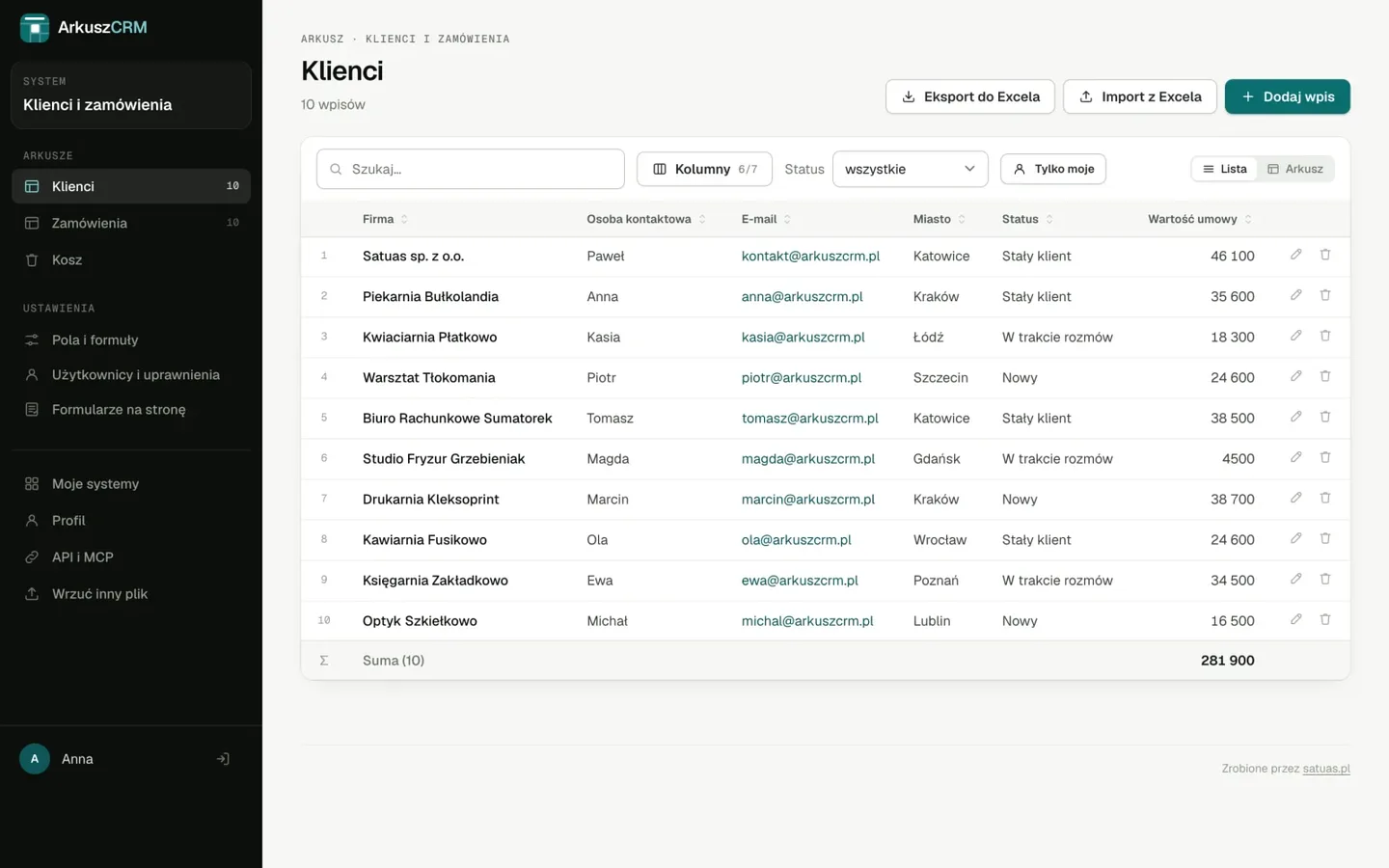
ArkuszCRM: a customer list with contact person, email, city, status and the total contract value

Questions about software for this industry

Which files can I upload?

xlsx, xls, ods, csv and tsv files. Tabs become sheets, columns become fields and rows become records. The limit is 10 MB and 5,000 rows per tab in one import.

What happens to formulas?

A column with the same formula in every row becomes a calculated field that updates live. Formulas that differ between rows or refer to other rows are kept as values.

Can I try it without an account?

Yes. The demo works without signing up for 7 days. When you create an account, you move the demo system over in one click.

Can I hide some data from my team?

Yes. Sheet-level access is available from the Start plan and field-level access from the Business plan. A hidden field does not appear in the list, exports, the API or the change history.

How much does it cost?

There is a free plan for one person, and paid plans cost PLN 49, 129 and 249 net a month, plus 23% VAT. Each plan includes a set number of people, and on paid plans each extra person costs PLN 10 net a month. A year costs the same as 10 months.

How do I track sales stages?

You track sales stages as a status field with a choice list, and a list filtered by status shows what is at each stage.

Try ArkuszCRM at your business

Start without paying and try the product on your own data. If you have a question, get in touch.